
A MaxDiff is one of the hardest question types to test by hand: every respondent sees different sets of items, and the properties that matter - does every item get the same exposure, does every pair of items ever meet, are the rows rotated - only show up across many respondents. SurveyTester answers MaxDiff tasks the way a respondent would and judges the exercise across all its test runs. The verdict appears on the Pages & Routing page as a balance icon with a summary dialog, and every deviation is reported as a finding.
What a MaxDiff is
MaxDiff (maximum difference scaling, also called best-worst scaling) measures the relative importance of a list of items, for example twelve features of a product. Instead of rating each feature, respondents see a series of tasks. Each task shows a small subset of the items, typically four or five, and asks for the most and the least important one.
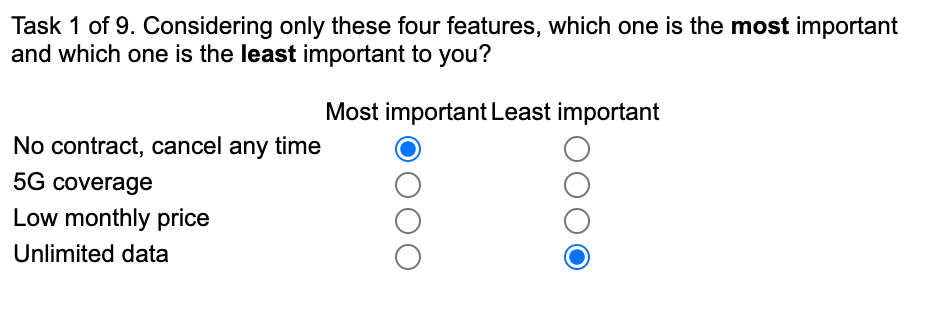
Behind the tasks sits a design: a plan that decides which items appear together in which task. A good design shows every item equally often, lets every pair of items meet about equally often, spreads the items over the row positions, and is usually split into several versions that respondents are assigned to. The survey platform (Sawtooth, Decipher, Qualtrics, Alchemer, Dimensions and others) generates the tasks from that design at runtime.
Why this is hard to test without SurveyTester
- One respondent proves nothing. A tester who clicks through the survey sees one version with nine or fifteen tasks. Whether item 7 ever meets item 11, or whether item 1 always sits in the first row, is invisible from a single pass.
- The errors are statistical, not visual. A task page looks fine even when the design behind it is broken: a filter that always drops the same item, a version assignment that never reaches version 4, or a row order that follows the item list instead of being randomised.
- The validation rule is easy to break. The survey must refuse a task where most and least name the same item. A missing or wrong rule only shows up when someone tries exactly that.
- Counting by hand does not scale. Checking item exposure and pair coverage means tabulating hundreds of tasks across dozens of respondents - work nobody does before launch.
SurveyTester does that counting for you, on every test run, and tells you in one line whether the exercise is very likely OK, not OK, or not judged yet.
How SurveyTester tests a MaxDiff
Detection and answering
SurveyTester recognises MaxDiff tasks on the supported survey platforms by their structure: a grid with a most column and a least column, each a single choice over the same items. The SurveyBots then always choose two different items, so they pass the survey's own validation and the test run continues like a real interview. If a platform or template is not recognised, you can mark the question as a MaxDiff yourself (see below).
The balance check
All task pages of one exercise count as one MaxDiff, even when the survey spreads them over nine or fifteen pages. Across all test runs of the project, SurveyTester counts which items each task showed, in which row, together with which other items, and what was answered. From that it judges four things:
| Check | What it counts | When it reports |
|---|---|---|
| Most never equals least | Every submitted task: did the survey accept the same item as most and least important? | Immediately, on the first accepted task |
| Items shown equally often | How often each item appeared across all tasks of all runs | When the most-shown item appears more than 1.5 times as often as the least-shown one |
| Rows rotated | Whether pairs of items were ever seen in both orders (A above B and B above A) | When the row order is fixed - a fixed order scores 0 even though middle items seem to move |
| Pairs share a task | How often every two items appeared in the same task | Only once enough tasks were seen for every pair to have met about three times; a pair that still never met points to a design gap |
The checks compare the items with each other, not with a target number, so SurveyTester needs no knowledge of the design. The balance checks wait for a minimum number of test runs (five by default) before they judge; the validation check reports at once.
Where you see the result
Open Pages & Routing. Every task page of a MaxDiff shows a balance icon in the Expectations column: green when the checks hold, orange when a deviation was found, dashed grey while there are not enough runs yet.
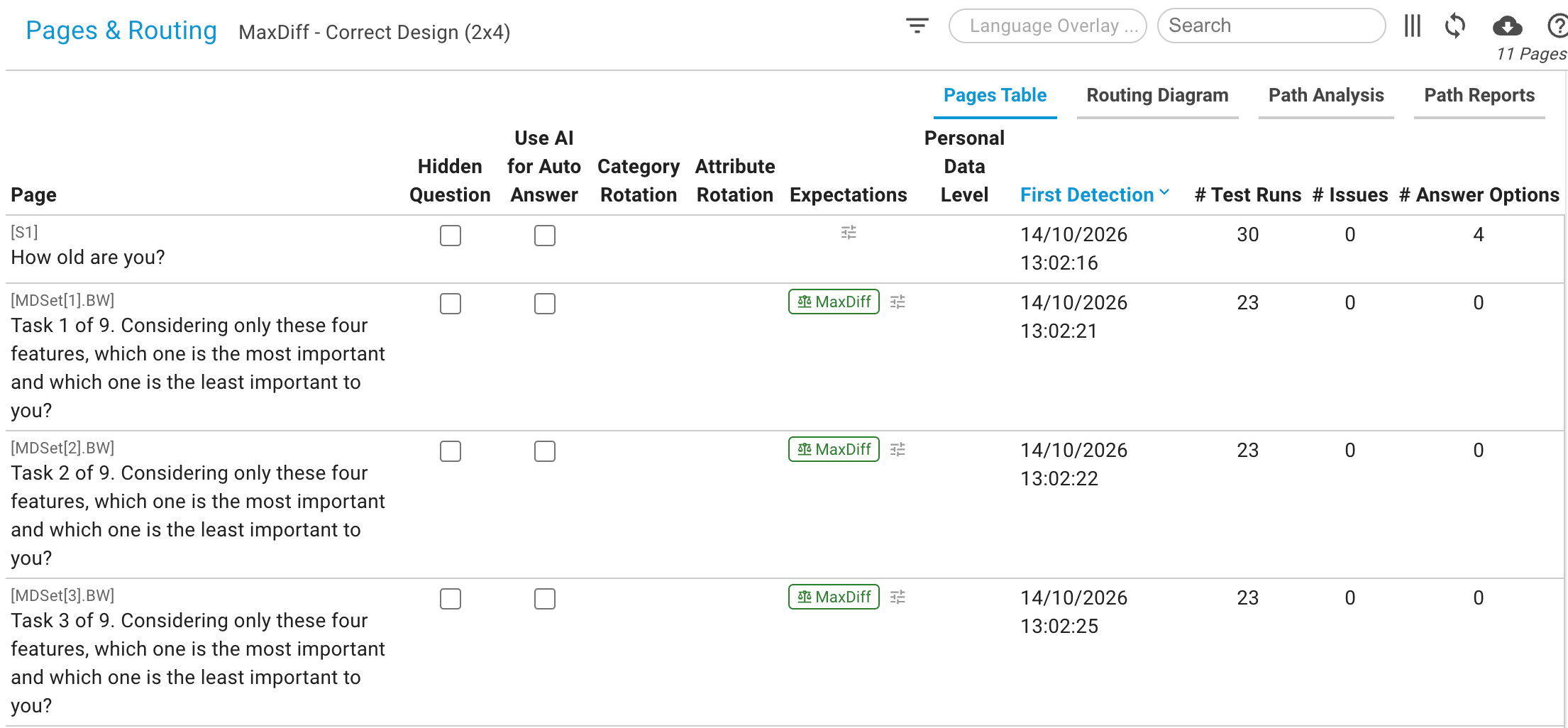
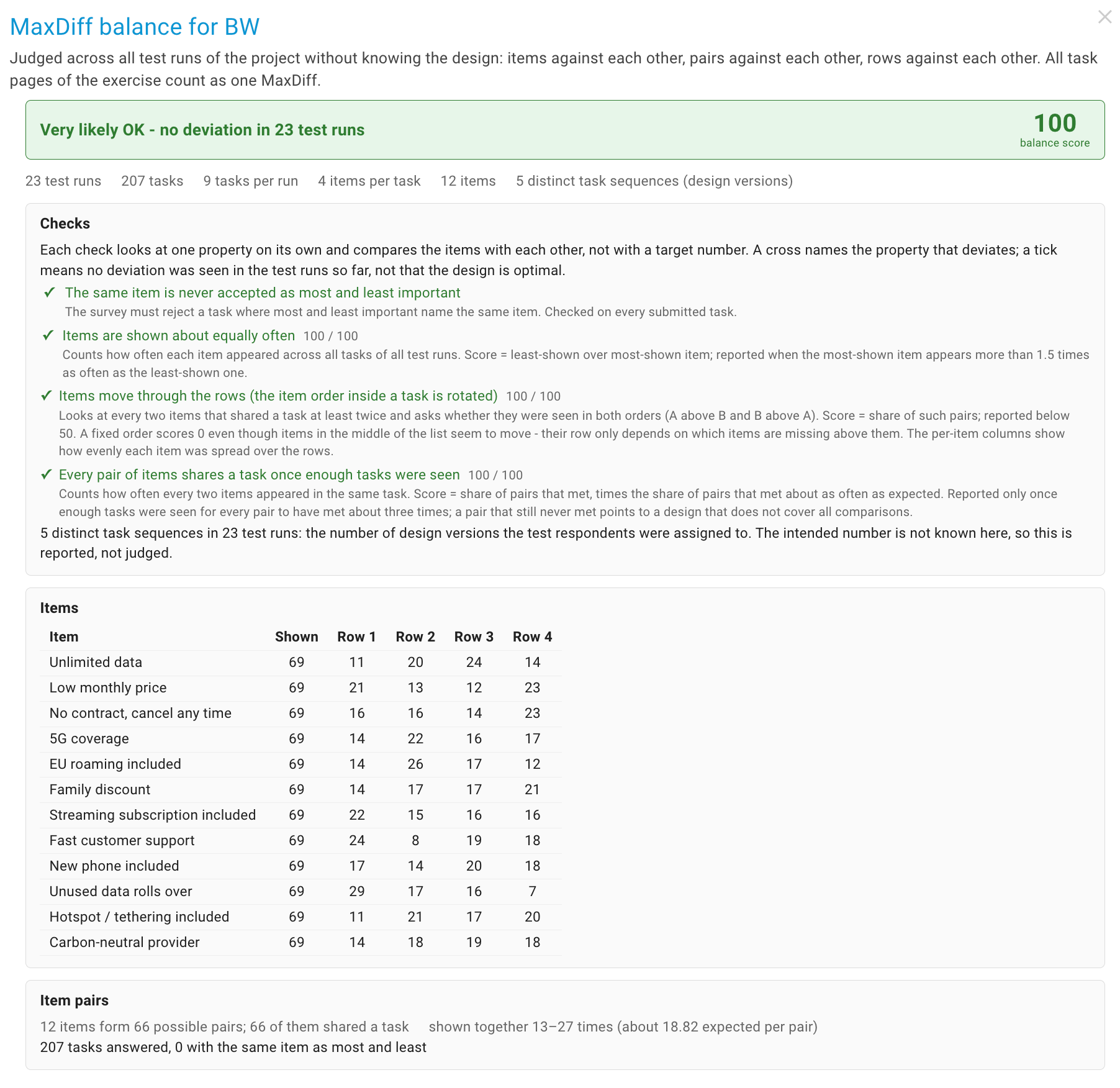
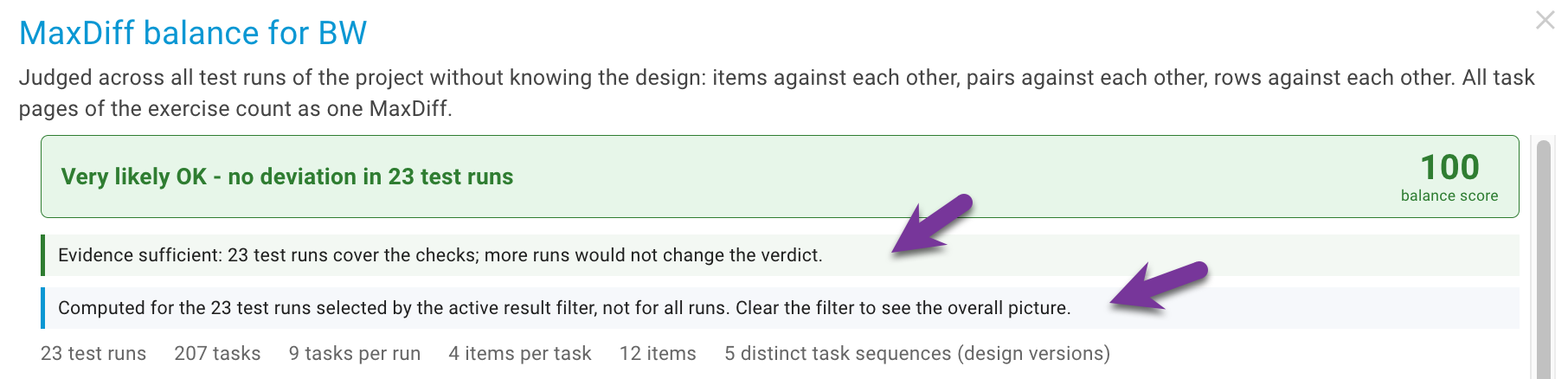
Click the icon to open the MaxDiff balance dialog:
- Verdict banner - Very likely OK, Not OK with the failing checks and their numbers, or No verdict yet with the number of runs still needed - plus a balance score from 0 to 100.
- Evidence line - whether the evidence is sufficient, or why more test runs are recommended: fewer runs than the minimum, too few tasks for the pair check, or a new task sequence that still turned up in the last runs (the version assignment is not covered yet).
- Checks - the four checks with a tick or a cross, their scores and a short explanation of what each one counts.
- Items - every item with the number of times it was shown and how those exposures spread over the rows.
- Item pairs - how many of the possible pairs shared a task, how often, and a list of every pair that never did.

The numbers are refreshed by the project scan that runs after finished test runs. Reload the page after a batch of runs to see the latest state.
Findings
Every deviation is also an AutoDetect finding under the check MaxDiff Balance, so it appears in the findings list, can be approved into an issue or declined, and is withdrawn automatically once it is no longer seen - for example after the survey author fixed the row rotation and new test runs show it.
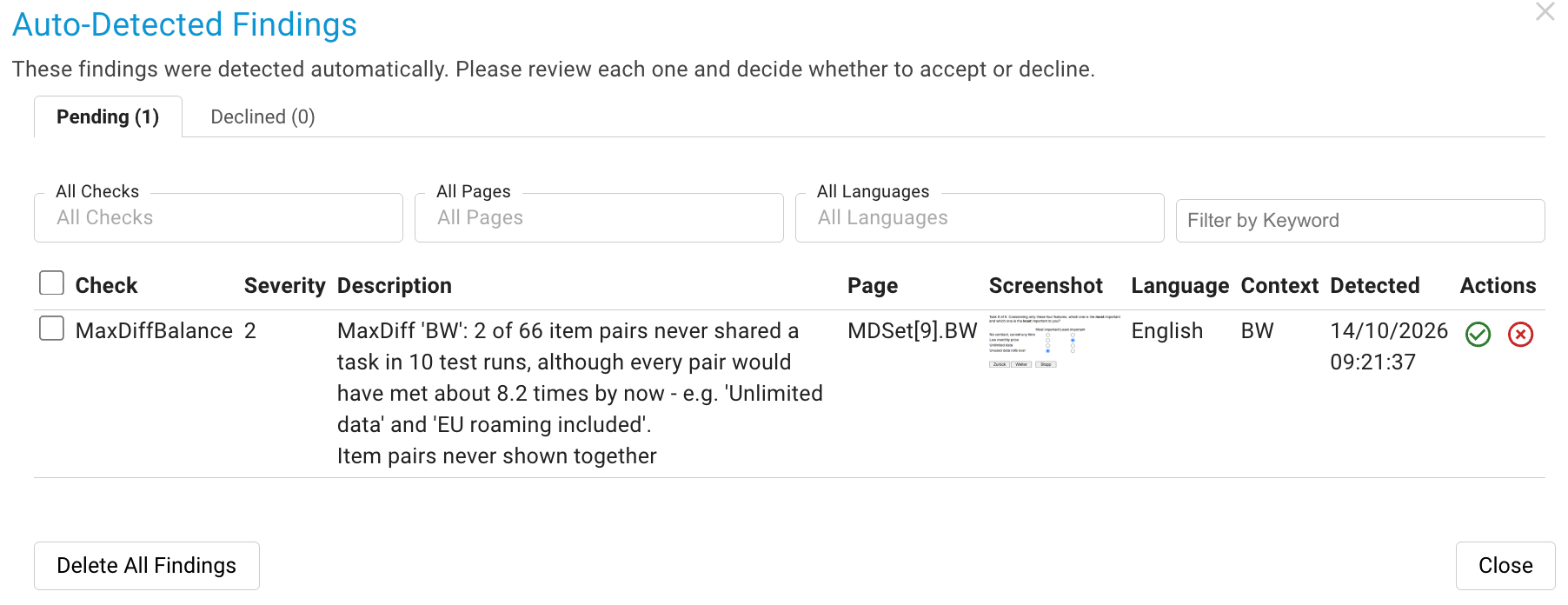
The check can be switched on and off per company, project type or project like every other AutoDetect check, see Auto Detect Issues.
Checking a fix with a result filter
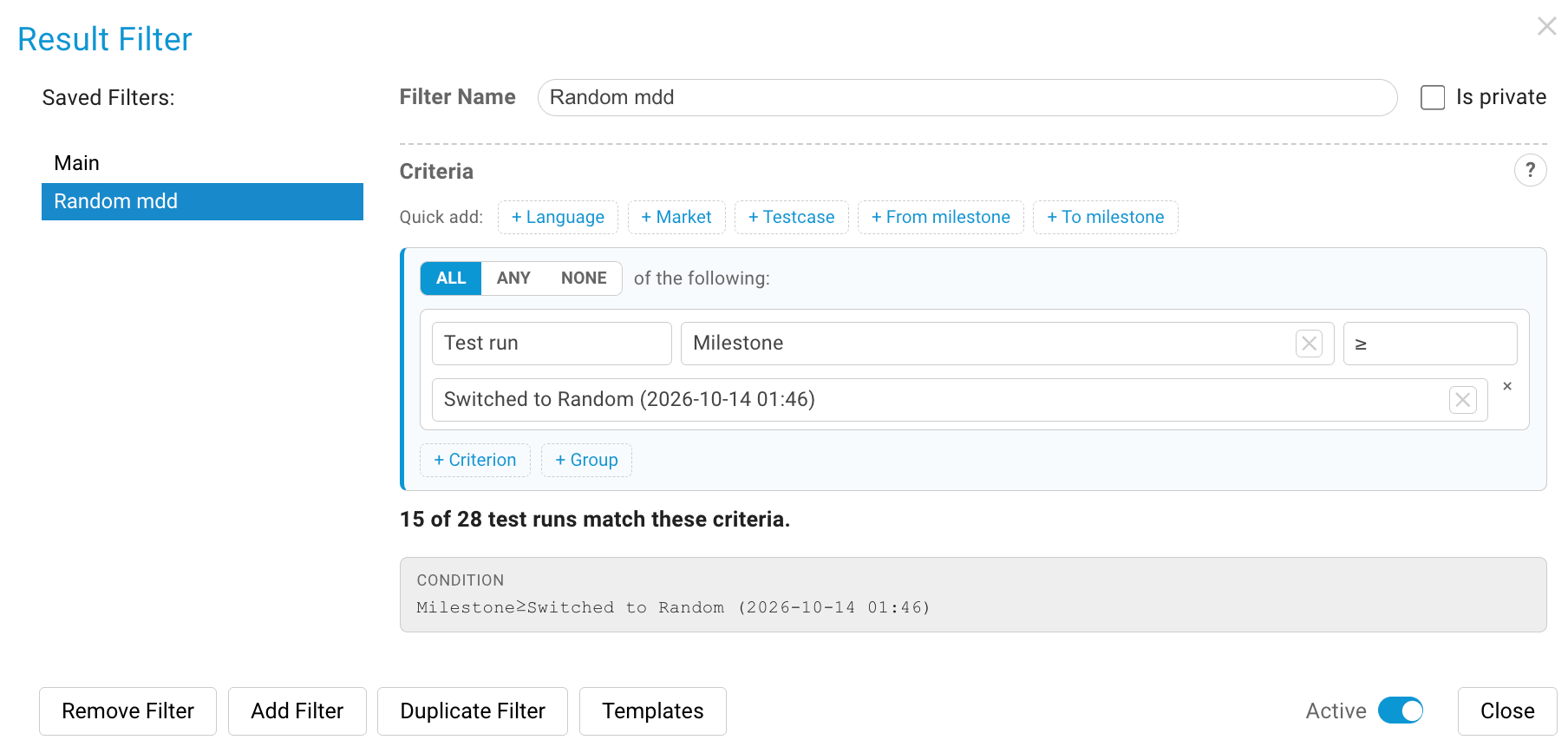
The typical cycle: a test batch finds a deviation, the survey author fixes the design, and you want to know whether it is solved now. Set a milestone at the time of the fix and activate it as result filter. The balance dialog is then computed for the filtered test runs only and says so in a note, while the findings keep the history. See Result Filter for filters and milestones.
Marking a question as MaxDiff yourself
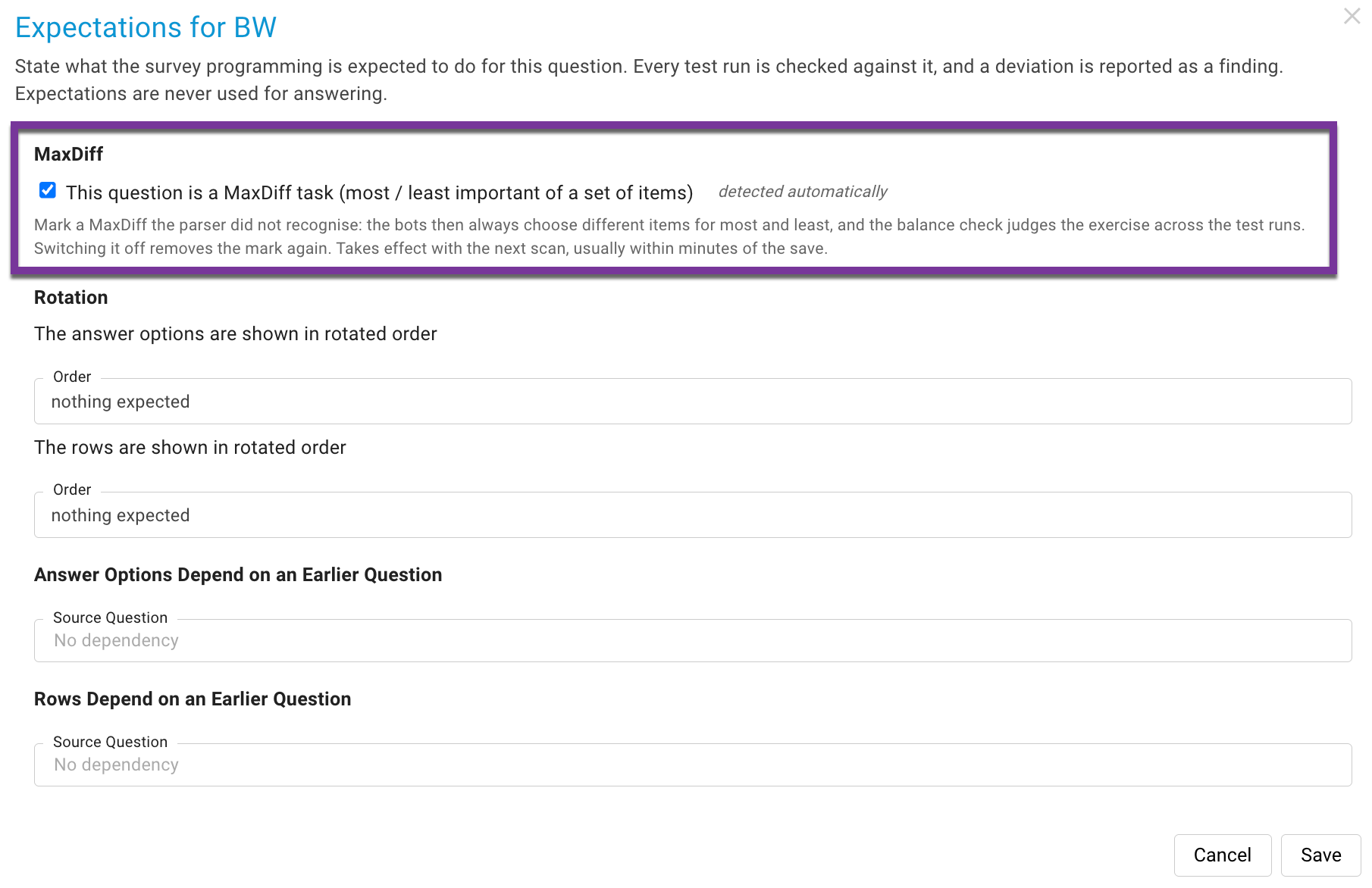
When SurveyTester does not recognise a MaxDiff task - an unusual template or a platform without a dedicated MaxDiff type - open the question's Expectations dialog from the Pages table and switch on This question is a MaxDiff task. By default the switch applies to every task page of the exercise at once. From the next test run on, the SurveyBots choose different items for most and least, and the balance check includes the exercise. The switch is only available for questions with the shape of a MaxDiff task: a grid with two columns, each a single choice over the same items. For other questions it stays visible but disabled, with the reason shown.
Step by step
- Create the project with the survey link as usual and run a first test run to let SurveyTester detect the pages.
- Open Pages & Routing and check that the task pages carry the MaxDiff balance icon. If not, mark the question as described above.
- Run a batch of SurveyBots. Ten runs are a good start: enough for the row and pair checks, and with version assignment by respondent number every version is seen twice.
- Reload Pages & Routing and open the balance dialog. Read the verdict and the evidence line; run more bots if the evidence line asks for it.
- Hand deviations to the survey author as findings or issues. After the fix, set a milestone, activate it as result filter, run the next batch and check that the deviation is gone.
How many test runs are enough
| Property | Runs needed |
|---|---|
| Row rotation | About five: a rotated order shows pairs in both orders quickly |
| Pair coverage | Enough tasks for every pair to have met about three times; the dialog shows the current value |
| Design versions | Twice the number of versions when respondents are assigned in order; more when assignment is random, until no new task sequence appears |
| Most never equals least | Volume does not help: the SurveyBots never give that answer. Test the rule with a deliberate wrong answer in a manual run |
The evidence line in the dialog applies exactly these rules and tells you when to stop.
Notes
- The verdict is relative: a green tick means no deviation was seen in the test runs so far, not that the design is statistically optimal. A design from a MaxDiff design tool should pass all four checks.
- The pair check cannot know whether a sparse design is intended. It reports a pair that never met once every pair could have met several times; the survey author decides whether that is acceptable.
- The scores are a graded view next to the hard verdict: exposure as least-shown over most-shown item, rows as the share of pairs seen in both orders, pairs as coverage times evenness.
- The balance check works the same way for every platform where the MaxDiff is recognised or marked; the platform's own design logic is not read.
Key takeaway
A MaxDiff cannot be validated by clicking through it once. SurveyTester runs it like dozens of respondents, counts what each task showed, and gives you a verdict with the evidence behind it - before the first real respondent sees a broken design.