
Create responses from predefined personas with specific demographic or behavioral attributes.
Benefits
- More authentic respondent simulation
- Better audience-specific testing
- Validation of survey experiences across different respondent profiles
Step by step
- Open the project in SurveyTester and go to Test Survey.
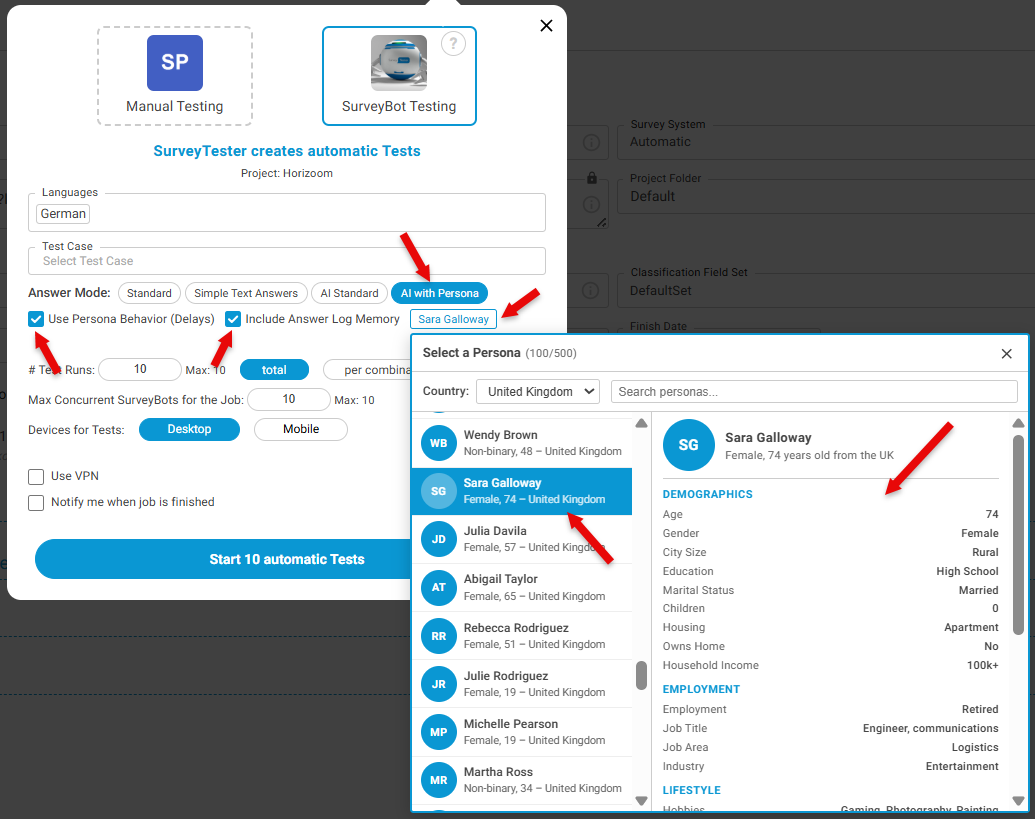
- Under Answer Mode, click on AI with Persona.
-
Select Use Persona Behaviour (Delays): SurveyTester simulates more realistic respondent behavior by introducing natural delays between answers.
-
Include Answer Log Memory: AI remembers answers that have already been provided during the current survey session and uses that context when generating subsequent responses.
-
Enabling both these options generates the most realistic AI respondent experience
-
Disabling both of these options gives the fastest test execution
-
Select a predefined Persona and review the persona attributes for the selected persona)
-
- Choose Start Testing using the selected persona.
 Result: Responses are generated based on the persona's characteristics and behavior.
Note
The demographic description of the persona selected should match the test case criteria. For example, if the test case is Male aged 50 and below, the above persona will contradict.