
The Survey Metadata Upload feature allows users to upload survey metadata script files like mdd, XML, etc. before the first test run. SurveyTester uses the uploaded metadata to automatically create Pages based on the survey questions defined in the metadata file.
This streamlines survey setup, improves question detection, and enables testing activities to begin sooner.
Use Survey Metadata Upload when:
- Setting up a new survey in SurveyTester.
- Working with surveys from Dimensions environments.
- Preparing test cases before any survey responses have been collected.
- Validating that all survey questions are included in the testing process.
Step-by-Step Instructions
You can locate this feature under Pages & Routing and click on Upload Survey Metadata to upload the file and get started.
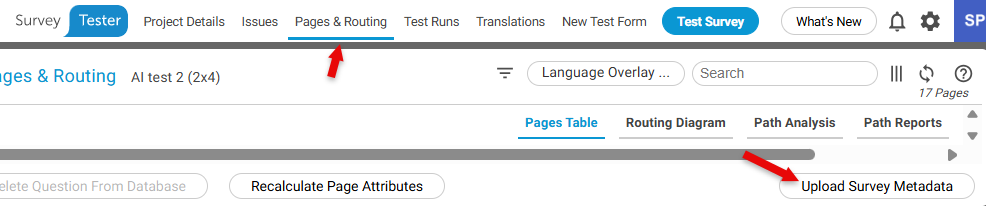
Upload Survey Metadata
- Open the survey in SurveyTester.
- Navigate to the Survey Metadata Upload option.
- Select Upload Metadata.
- Browse to and select the survey metadata file.
- Confirm the upload.
SurveyTester imports the survey structure and automatically creates Pages based on the questions defined in the metadata.
Begin Testing
- Create or review the generated test cases.
- Start running survey tests.
- Track coverage across the imported survey questions.
Testing can begin immediately without manually creating Pages.
Feature Details
Automatic Page Creation: After a successful upload, SurveyTester:
- Reads the survey metadata file.
- Identifies survey questions and structure.
- Automatically creates Pages for the imported questions.
- Makes the survey available for test case preparation.
Question Detection: SurveyTester uses the imported metadata to:
- Detect survey questions in advance.
- Improve survey setup accuracy.
- Help ensure complete testing coverage.
Notes and Limitations
- Metadata should be uploaded before the first test run for the best experience.
- The quality and completeness of the imported structure depend on the metadata provided.
- Users should review the imported survey structure after upload to confirm accuracy.
Business Value
The Survey Metadata Upload feature provides:
- Faster survey setup and onboarding.
- Improved integration with Dimensions environments.
- Earlier visibility of survey questions.
- Upfront creation and preparation of test cases.
- Reduced manual setup effort.
Example Use Case
A tester receives a survey definition from a Dimensions environment before testing begins. Instead of manually creating Pages and identifying questions, the tester uploads the survey metadata file into SurveyTester. The system automatically generates the survey structure, allowing test cases to be prepared immediately and reducing setup time.
Key Takeaway
Survey Metadata Upload simplifies survey onboarding by automatically importing survey definitions and creating Pages, enabling users to prepare and start testing faster.