
A testcase describes one respondent. Real respondents are consistent: someone who says 34 at the age question picks "25-34" at the age group, and a sample record that says the respondent is 34 should not meet a testcase that answers 66. Two testcase options keep that consistency for you.
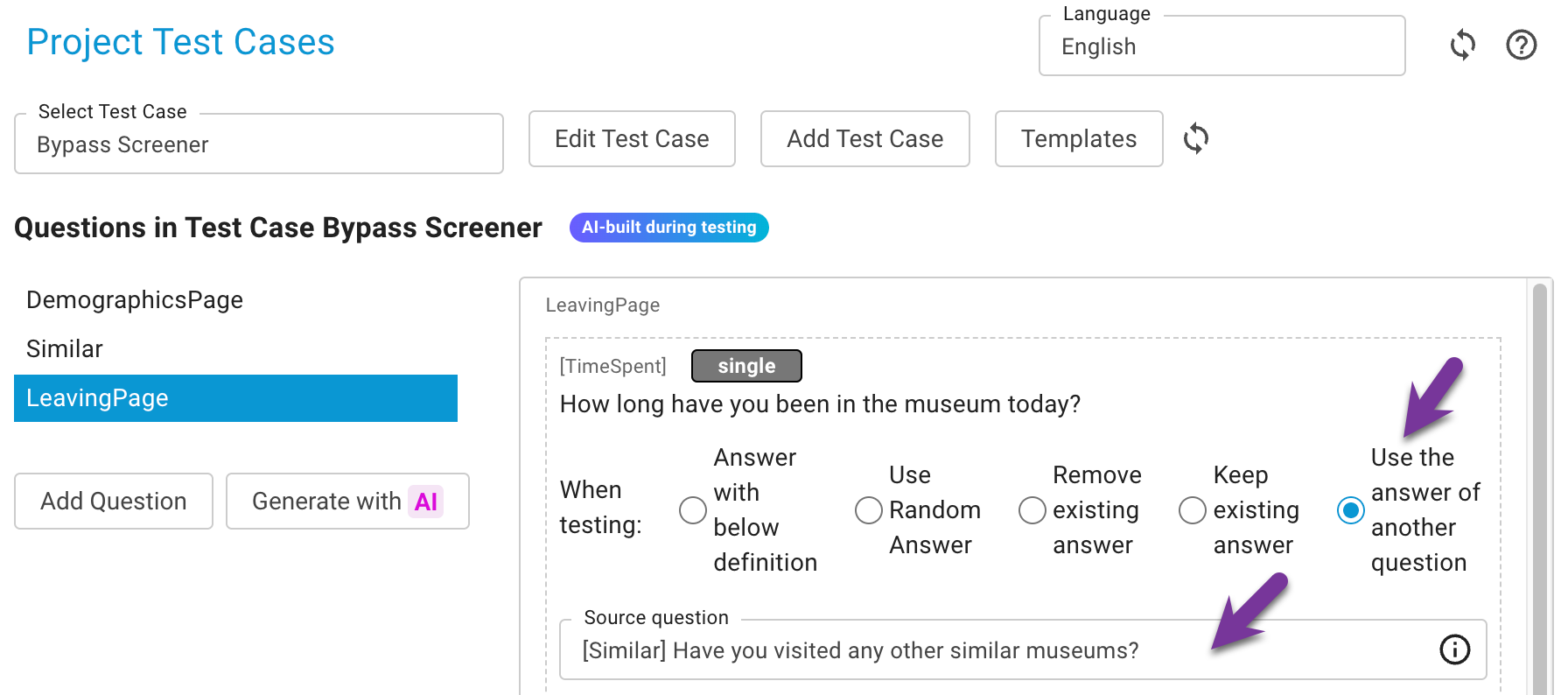
Use the answer of another question
Next to the answer modes definition, random, remove and keep, a testcase question can be set to Use the answer of another question: in the test run it repeats what the chosen source question was answered, instead of carrying its own definition. Available for single, multiple, text and numeric questions.
The mapping also works across question types:
| Source answered | Target question | Answer given |
|---|---|---|
| a number (age 34) | single choice with age ranges | the range that contains 34 |
| a range ("25-34") | numeric | a number inside the range |
| a category | single or multiple choice | the category with the same value or the same label |
| a text | text | the same text |
When the source question has no answer yet in the run, the target gets a random answer and the run is marked with a warning, so the testcase never leaves a question empty.
Keep the sample record consistent with the testcase
When a sample field is connected to a question and the testcase defines that question, the test run takes a free sample record whose value matches the definition. If no such record is left, the connected value of the reserved record is rewritten to match; the uploaded record is kept, such records are marked in Sample Management, and a reset restores them.
Every testcase question connected to a sample field shows the switch Keep the URL parameter consistent with this answer. Switch it off to test the contradiction on purpose - for example whether the survey forces a screenout when the URL says 66 and the answer is 34.
Step by step
- Open the testcase and the question that should follow another one.
- Choose Use the answer of another question and pick the source question. The mode is saved once a source is chosen.
- For questions connected to a sample field, decide per question whether the sample record must match the answer (default on) or whether the contradiction is the point of the test.
- Run the testcase; the test run steps show the answers given, and a warning marks a source that had no answer.
Notes
- Grid, yes/no and date questions cannot be sources or targets yet; they keep their own definition.
- Duplicating a testcase or saving it as a template carries both settings along.
- A conditional testcase answer (see Conditional testcase answers) can be combined: the condition decides which column applies, the column may follow another question.
Key takeaway
Consistency is part of a realistic test: let related questions share one answer and let the sample record agree with it, except when you deliberately test what happens if they disagree.