
TURF (Total Unduplicated Reach and Frequency) is an analysis, not a question type. It runs on the data after fieldwork and finds the combination of products, flavours or claims that reaches the most respondents. Its input is an ordinary question: a purchase-intent grid ("How likely would you be to buy ...?" for every item) or a multi-select ("Which of these would you buy?"). Mark that question as TURF in its Expectations dialog, and SurveyTester checks across your test runs whether it collects what the analysis needs: every item shown to every respondent, a rotated order, one answer scale, no limit on the number of answers, an exclusive "None of these" and the same items in every language. SurveyTester does not calculate reach or frequency itself.
What a TURF design needs from the programming
The analysis can only be trusted when the question collects a complete, unbiased picture from every respondent:
- Every respondent sees every item. TURF combines items per respondent. An item a respondent never saw counts as "would not buy" and quietly lowers its reach.
- The item order is rotated. Items at the top of a long list are chosen more often. Without rotation, the first items win the TURF.
- One answer scale for all items (grid). Reach is counted at one threshold, for example the top two boxes. This only works when every row uses the same scale.
- No limit on the number of answers (multi-select). "Choose up to 3" cuts reach off at three items per respondent. The result describes the limit, not the market.
- An exclusive "None of these" (multi-select). Respondents who would buy nothing need a clean answer instead of a random tick.
- The same item list in every language and every wave. A missing or merged item in one country makes the countries impossible to compare.
Why this is hard to test without SurveyTester
- One interview shows one order. Whether the list rotates, and whether "None of these" stays at the bottom, only shows across many interviews.
- Missing items do not show. A filter from an earlier question or a random subset removes items from some respondents. The page still looks complete, because the tester cannot see what is not there.
- A limit looks harmless. "Please select up to 3" reads like an instruction, not like a design error.
- Translations drift. One language with a missing flavour is easy to overlook among dozens of pages.
How SurveyTester checks a TURF question
No survey system has a TURF question type, so SurveyTester cannot recognise one on its own: you mark it. Open Pages & Routing, click the edit icon in the Expectations column of the question and tick This question feeds a TURF analysis. The dialog shows which list holds the items: the rows of a grid, or the answer options of a multi-select. The switch is available for grids and multi-selects with at least two items.
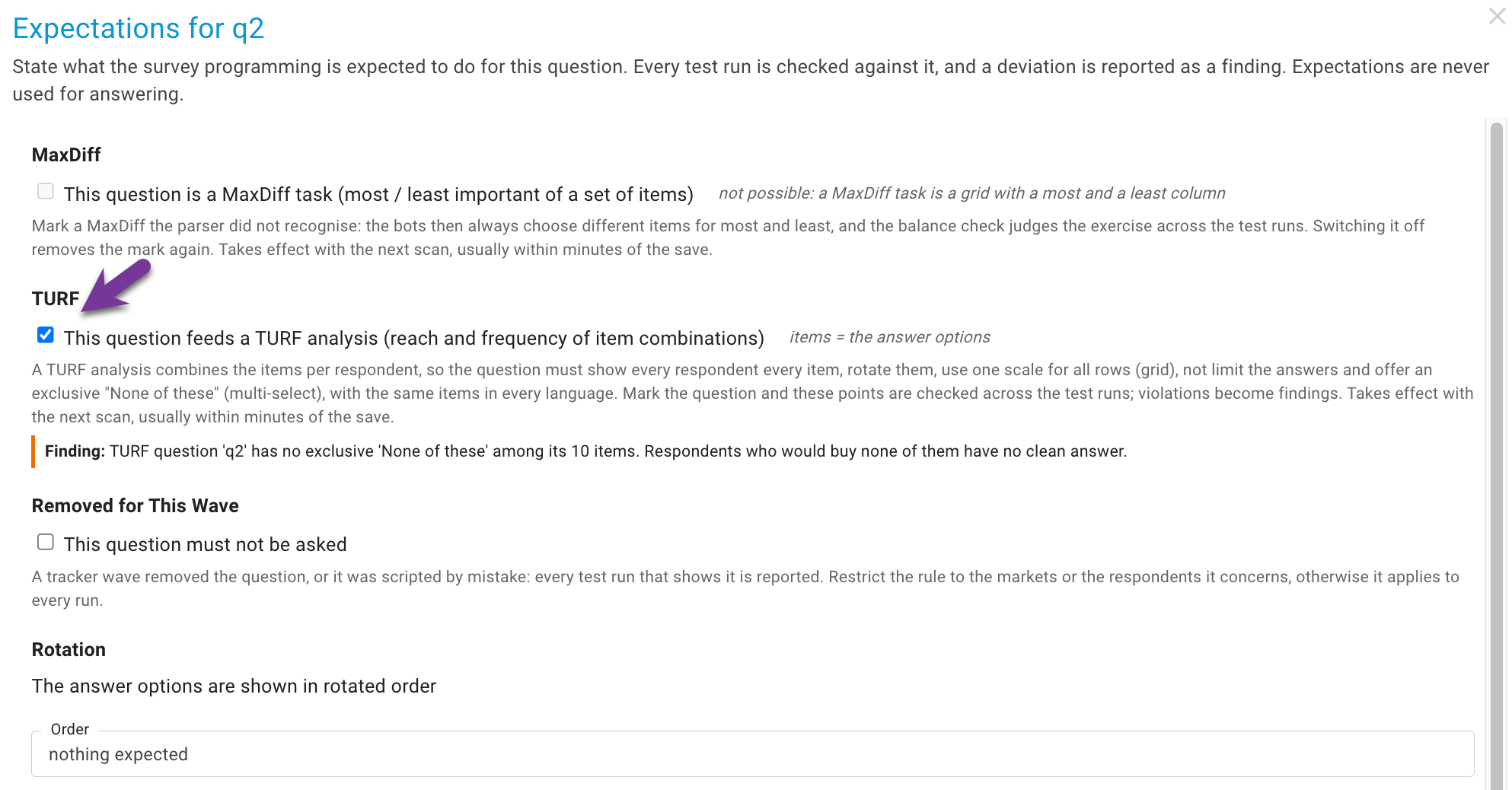
From then on, every scan of the test runs judges the question:
| Check | What the test runs must show | Judged |
|---|---|---|
| Every respondent sees every item | Every time the question was shown, it listed all of its items. Items the project knows but no run ever showed count as missing too. | at once; never-shown items after five runs |
| The order is rotated | Items shown together appear in both orders across the runs. "None of these" is left out. | after five runs |
| One answer scale for all rows | All rows of the grid carry the same answer values. | at once (grids only) |
| No limit on the number of answers | The survey accepts as many answers as there are items. | at once (multi-selects only) |
| An exclusive "None of these" | One answer option clears all others. A user override of the exclusive flag counts. | at once (multi-selects only) |
| The same items in every language | Each language showed the same items. | once two languages showed the question at least twice |
A TURF button appears in the Expectations column: green when every check holds, red when one is violated, dashed while a verdict still needs more test runs. It opens a summary with every check, what the runs showed for it, and how often each item was shown and shown first.
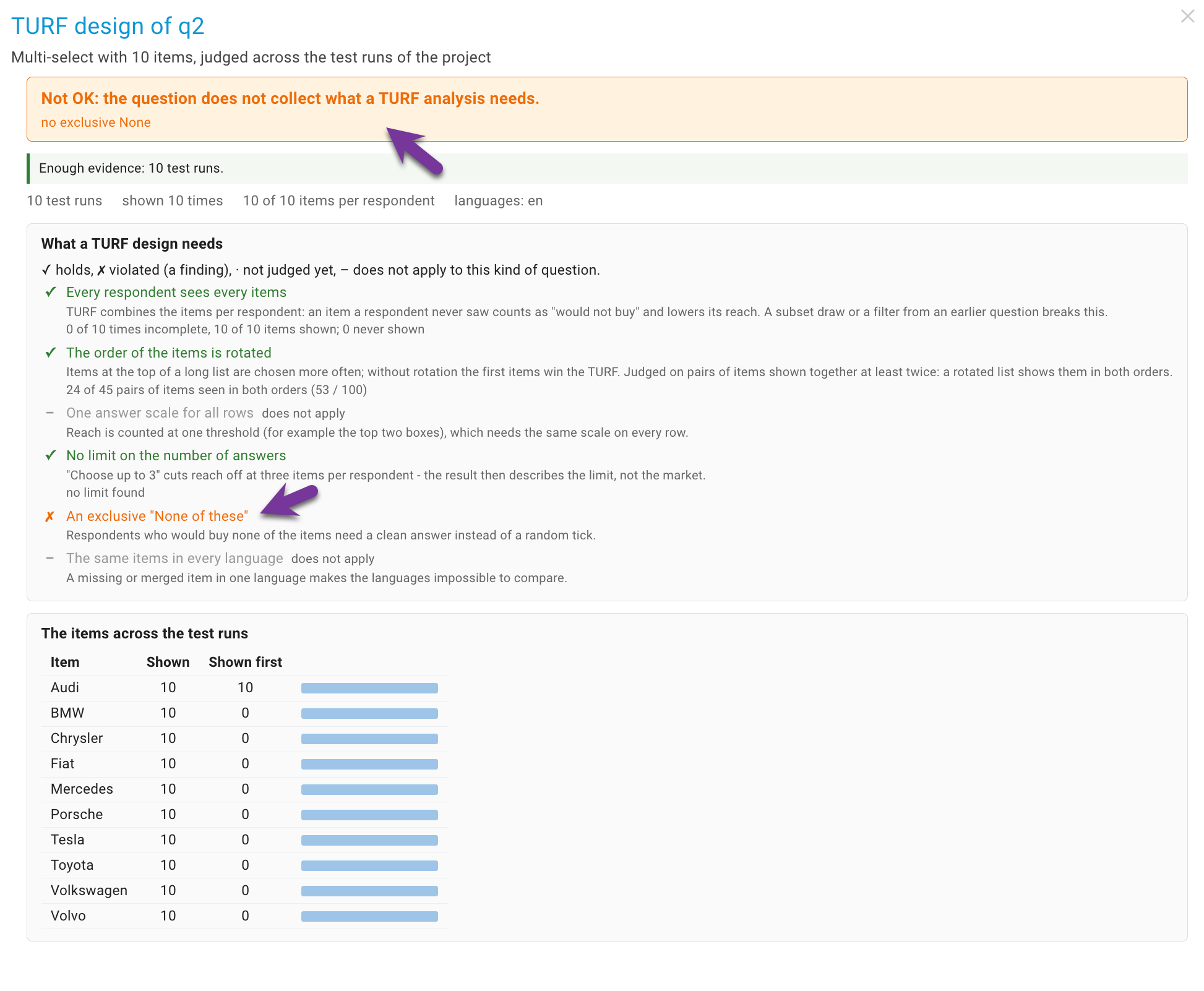
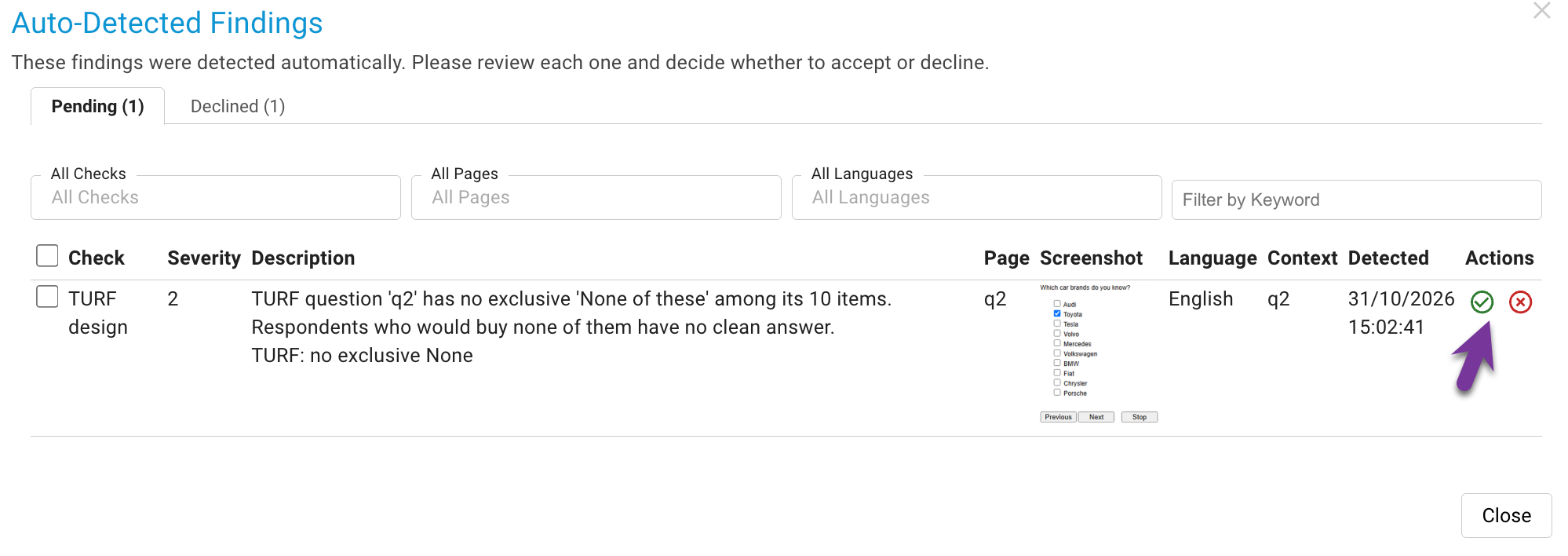
Each violation is a finding under the check TURF design, written with the test run that showed it. Like every finding, it can be approved into an issue or declined. It is withdrawn once the check holds again, or when you remove the TURF mark. With an active result filter (for example a milestone after a fix), the summary is computed for the filtered runs only, so you see whether the fix worked.
Step by step
- Run a first batch of SurveyBots so that the pages and the TURF question are detected.
- Mark the question. In Pages & Routing, open the question's Expectations dialog, tick This question feeds a TURF analysis and save.
- Run more SurveyBots, at least five interviews that reach the question, in every language you field.
- Open the TURF button in the Expectations column and read the checks. Hand the findings to the programmer.
- After the fix, run again. Set a milestone and filter on it to see the state since the fix. Findings that no longer reproduce are withdrawn.
Good to know
- Waves. The checks compare the languages of one project. To compare the item list with the previous wave, use Comparing a project with a previous wave.
- The answer limit is read from the survey page or its error message. A survey that silently ignores extra answers shows no limit. A test case that selects every item tells you for sure, see Conditional testcase answers.
- Item texts are checked by the spell check like every other label, see Spell check.
- Switching the check off. The check is called Check TURF Design in the Auto-Detect settings, see Auto Detect Issues.
What SurveyTester does not do
- No TURF analysis. SurveyTester does not calculate reach, frequency or the best item combination. SurveyBots answer at random, so their reach figures would mean nothing anyway.
- No check of the threshold. Which scale points count as "would buy" is decided in the analysis, not in the survey.
- No check of the data export. How the items are coded in the data file is outside the survey pages.
- No automatic recognition. A TURF question looks like any other grid or multi-select; you mark it.
Key takeaway
A TURF result is only as good as the question behind it. Mark the question as TURF, run your SurveyBots, and the TURF button tells you whether every respondent saw every item, in rotation, on one scale, without a limit and with a clean "None of these".