
When configuring a test case, SurveyTester provides visibility into the end page identifiers already associated with the selected expected outcome. This helps you understand how SurveyTester will determine and classify the survey result, reducing the need to manually add identifiers that already exist at the project or project-type level.
The overview displays identifiers configured at both the project level and the project-type level, making it easier to validate your test case setup and identify any missing end page definitions.
When to Use This Feature
Use the End Page Overview when:
- Creating a new test case.
- Updating an existing test case's expected outcome.
- Verifying how SurveyTester will classify survey results.
- Determining whether additional end page identifiers are required.
- Reviewing project-specific identifiers alongside inherited project-type identifiers.
View End Page Identifiers for a Test Case
- Open the test case you want to configure.
- Locate the Expected Outcome field.
- Select an outcome, such as:
- Completed
- Screenout
- Quota
- Early Complete
- Review the inherited End Page Overview displayed for the selected outcome.
- Examine the identifiers shown from:
- The current project
- The associated project type
- If the required identifier is already listed, no further configuration is necessary.
- If a required identifier is missing, add a new identifier to the test case configuration.
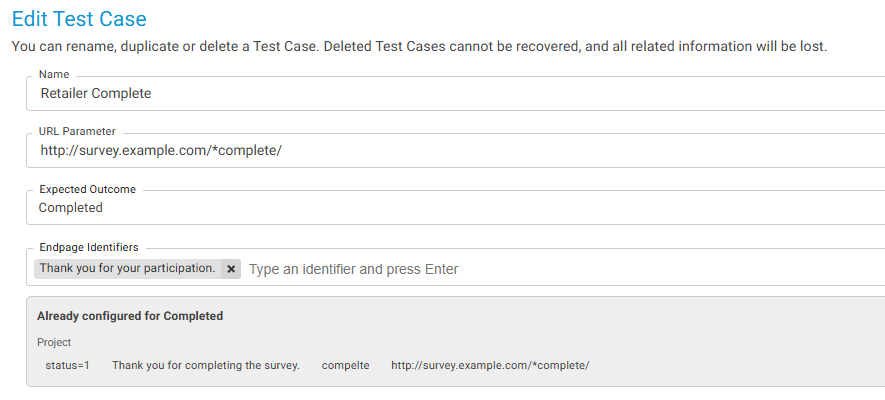
Information Displayed
| Item | Description |
|---|---|
| Expected Outcome | The survey result that the test case is expected to reach. |
| Project Identifiers | End page identifiers configured specifically for the current project. |
| Project-Type Identifiers | Already configured for Completed. End page identifiers inherited from the project's assigned project type. |
Benefits
- Improves visibility into end page configuration.
- Reduces duplicate identifier creation.
- Helps ensure test cases use existing project and project-type settings.
- Makes it easier to understand how survey runs will be classified.
- Speeds up test case setup and troubleshooting.
Notes
- The End Page Overview is updated based on the selected Expected Outcome.
- Both project-level and inherited project-type identifiers are shown for reference.
- Displayed identifiers help determine which end pages will trigger survey completion classification for the selected outcome.
- If no matching identifier exists, you can add a new one to ensure the survey run is classified correctly.
Example Use Case
A test case is configured with an expected outcome of Screenout. When the outcome is selected, SurveyTester displays all Screenout identifiers configured at both the project and project-type levels.
The tester sees that the required Screenout URL pattern is already defined at the project-type level and therefore does not need to add a duplicate identifier. If the desired URL is not displayed, the tester can add a new identifier specifically for that test case scenario.