
Survey End Page identifiers can now be configured at the project level, in addition to the identifiers inherited from the project type. This allows you to define project-specific end page matching rules without modifying the project type configuration.
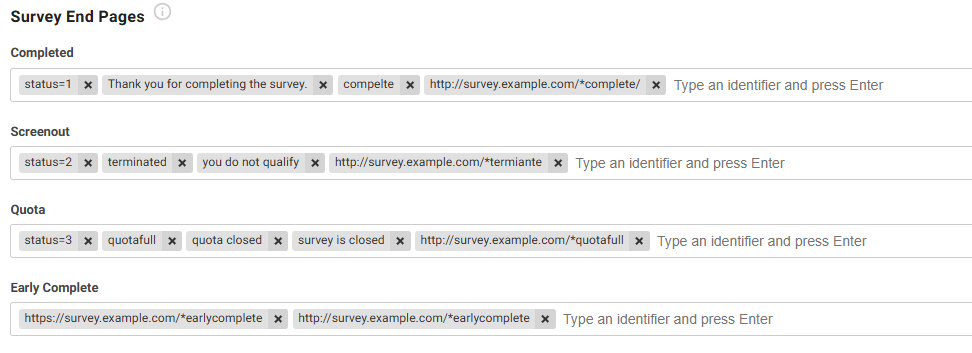
Survey End Pages section is available in the project's General settings. From this section, you can add, edit, or remove identifiers for the following survey outcomes:
- Completed
- Screenout
- Quota
- Early Complete
Inherited identifiers from the project type remain visible for reference, helping you understand which identifiers are applied by default.
Identifiers also support the * wildcard, allowing more flexible matching of URLs and page names.
Configure Project-Level Survey End Pages
- Open the project you want to configure.
- Navigate to General settings.
- Locate the Survey End Pages section.
- Select the outcome you want to configure:
- Completed
- Screenout
- Quota
- Early Complete
- Add, edit, or remove identifiers as needed.
- Review the inherited project-type identifiers displayed alongside the project-level identifiers for reference.
- Save your changes.
Identifier Details
| Option | Description | Example |
|---|---|---|
| Completed | Identifies survey completion pages. | status=1 |
| Screenout | Identifies pages shown when respondents do not qualify for the survey. | You do not qualify |
| Quota | Identifies pages displayed when a survey quota has been reached. | We have reached the target |
| Early Complete | Identifies pages used for respondents who complete the survey through an early completion path. | Thank you for completing the survey. |
| Wildcard (*) | Matches one or more characters in a URL or page name, enabling flexible pattern matching. | http://survey.example.com/*complete/... |
Notes
- Project-level identifiers supplement the identifiers inherited from the project type.
- Inherited project-type identifiers are displayed for reference and help ensure consistency across projects.
- The
*wildcard can be used within identifiers to match URLs or page names with variable text. - Use wildcard patterns carefully to avoid unintended matches.