
The AI Administration & Usage Controls feature allows administrators to manage the AI engines available within SurveyTester or add a custom AI Engine. AI engines power AI-driven capabilities, such as generating Test Cases from questionnaires. Before any AI features can be used, at least one AI engine must be configured and enabled.
Administrators can control which AI engines are available, set a default engine, assign engines to users, groups, or projects, and monitor AI consumption across the organization.
Use this feature when you need to:
-
Control & assign which AI models are available to your organization.
-
Monitor AI usage and consumption.
-
Establish governance and cost controls for AI-enabled functionality.
Ensure the following permissions are enabled for the appropriate administrative roles:
- Manage Company AI Engines: Allows administrators to create, configure, and maintain AI engines available to the organization.
- View AI Usage: Allows users to review AI usage and consumption statistics.
- Assign AI Engines: Allows users to assign AI engines to projects, users, or groups.
Once enabled, these options can be accessed from:
Administration & Settings → AI Engines
Administration & Settings → AI Usage
Step-by-Step Instructions
Configure & Assign AI Engines
- Navigate to Administration & Settings → AI Engines.
- Add or configure the AI engines available to your organization.
- Select the AI engine that should be used as the default engine.
- Save your changes.
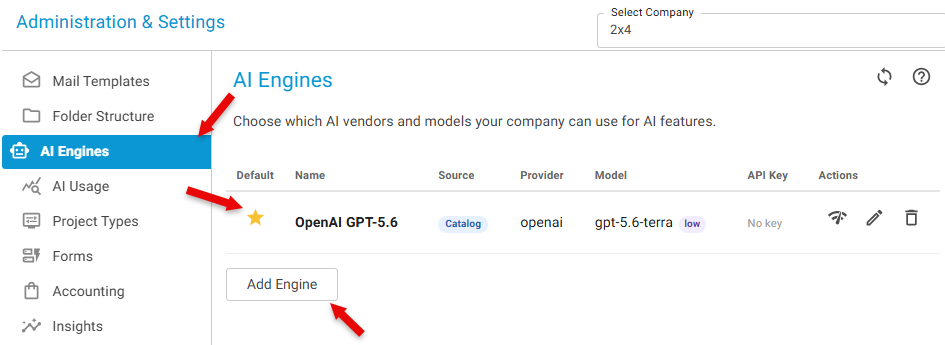
Configure Custom AI Engines
-
Navigate to Administration & Settings → AI Engines.
-
Click Add Engine.
-
Select the AI engine from the Catalog or add Custom and fill in the necessary details.
-
Save your changes.

Review AI Usage
- Navigate to Administration & Settings → AI Usage.
- View AI consumption metrics for your organization.
- Review usage details by project, user, engine, model, or time range as needed.
- Use the data to monitor adoption and manage AI-related costs.
Business Value
- Improved AI Governance through centralized management.
- Cost Visibility with organization-wide usage monitoring.
- Controlled Access by assigning AI engines only where needed.
- Flexible Deployment of different AI engines across projects and teams.
Notes
- AI-powered features are unavailable until at least one AI engine has been configured.
- Users must have the appropriate permissions to manage or view AI engine settings.
- AI usage statistics help organizations understand consumption and optimize AI-related costs.
Key Takeaway
SurveyTester provides centralized AI administration, allowing administrators to manage AI engine availability, control access, assign engines to projects and users, and monitor AI usage across the organization from a single location.