
Survey Path Analysis provides visibility into the different paths respondents can follow through a survey. It helps users understand branching logic, validate survey flow, and troubleshoot navigation issues.
Use this feature when you need to:
- Review survey routing and branching logic.
- Understand respondent journeys.
- Validate complex survey flows.
- Troubleshoot navigation or logic issues.
Before using this feature:
- Multiple survey tests must have been completed.
- The survey should contain branching logic, skip logic, or conditional paths.
View Survey Path Analysis
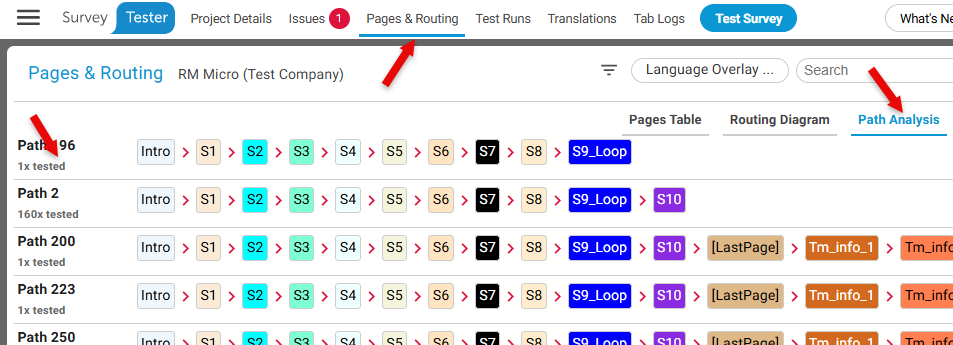
- Open the project and navigate to the Pages & Routing section.
- Go to Path Analysis near the search bar in the top-right corner of the screen.
- Review the available survey paths displayed by the system.
- Select a path to examine the sequence of pages, questions, and branching decisions.
- Compare different paths to understand variations in survey flow.
Expected Result
You can see how respondents move through the survey and identify which routes are taken based on branching logic and survey conditions.
Feature Details
| Feature | Description |
|---|---|
| Tracked Paths | Displays the different routes available within the survey. |
| Branch Analysis | Shows how respondents are routed through conditional logic. |
| Journey Visibility | Helps visualize the sequence of pages and decisions taken during the survey. |
| Flow Validation | Supports verification of complex survey behavior. |
Notes
- Surveys with extensive branching logic may generate multiple unique paths.
- Path Analysis reflects the routes identified during SurveyBot testing.
- Reviewing paths can help identify gaps, unexpected routing, or logic errors.
Example Use Case
A customer satisfaction survey contains multiple routing rules based on respondent answers. After running SurveyBot, the survey designer reviews Path Analysis to ensure respondents are directed to the correct follow-up questions and survey sections.
Key Takeaway
Survey Path Analysis provides deeper insight into survey navigation by revealing respondent paths and branching behavior, making it easier to validate survey flow and troubleshoot complex logic.