
SurveyTester now includes expanded AI capabilities throughout the testing workflow. These enhancements help users generate test cases faster, create realistic respondent answers, and simulate specific personas with minimal manual effort.
The SurveyTester AI Engine can be used to:
- Generate test cases from a user-defined description
- Generate answers for survey questions
- Create responses based on selected respondent personas
- Generate simple text responses using dictionary-based inputs
These capabilities significantly reduce manual work while improving test coverage and realism.
Business Value
- Faster survey testing setup
- More realistic respondent simulations
- Better coverage of survey scenarios
- Reduced manual effort during testing
- Increased testing efficiency and productivity
When to Use This Feature
Use AI-powered testing when you need to:
- Quickly create a large number of test cases
- Simulate realistic survey respondents
- Test survey logic across different audience types
- Validate survey behavior with diverse responses
- Reduce time spent creating manual test data
AI for Test Cases & AI for Generating Answers
Use the SurveyTester AI Engine to automatically create test cases based on a description and of the survey or testing objective and generate suitable responses for survey questions.
Benefits
- Rapid creation of test scenarios
- Reduced manual test design effort
- Faster response generation
- Realistic answer patterns
- Efficient survey validation
Step by Step
- Open the project in SurveyTester and go to Project Details.
- Navigate to Test Case in the left panel and click Add Test Case.
- Enter the details such as Name, Expected Outcome, End page identifier of the survey, or testing requirements.
- Enter the Respondents Description by providing the details of the qualifying logic for the desired outcome.
- Enable AI supported Test Case Generation (this can further be modified based on the Test Case results generated)
- Click Add.
- Review the generated test cases and make adjustments if required.
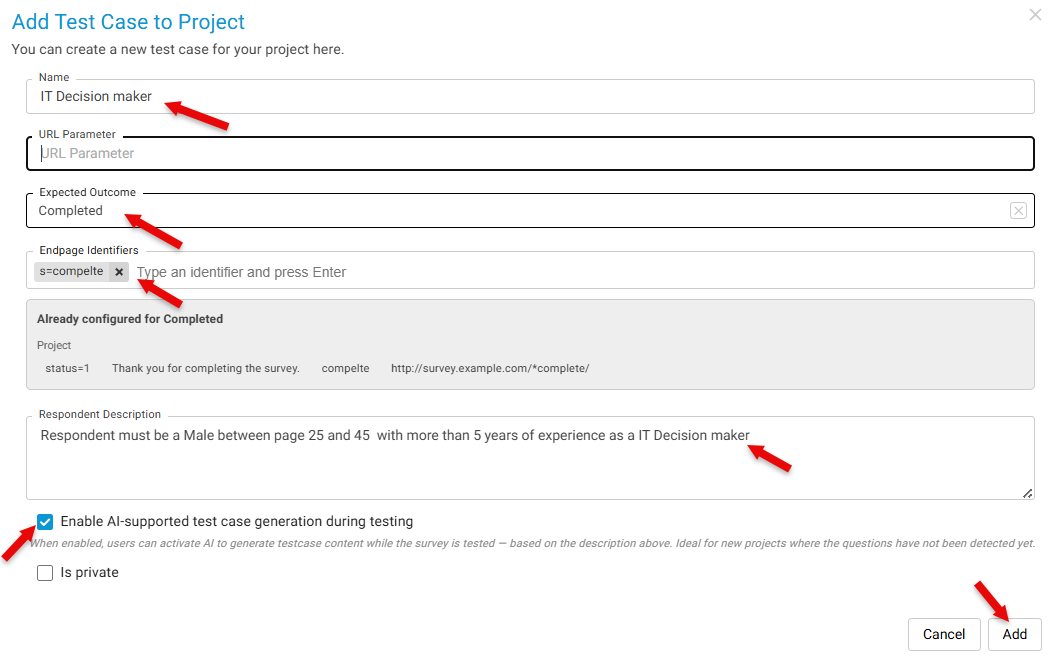 Result: SurveyTester creates test cases automatically based on the provided description.
Use Simple Text Answers or AI Standard
Provide answers using simple text inputs from a predefined dictionary or AI-generated based on the survey type.
Benefits
- Quick response generation
- Consistent test data
- Useful for basic survey validation
Step by step
- Open a test survey session.
- Select Simple Text Answers or AI Standard.
- Start Testing.
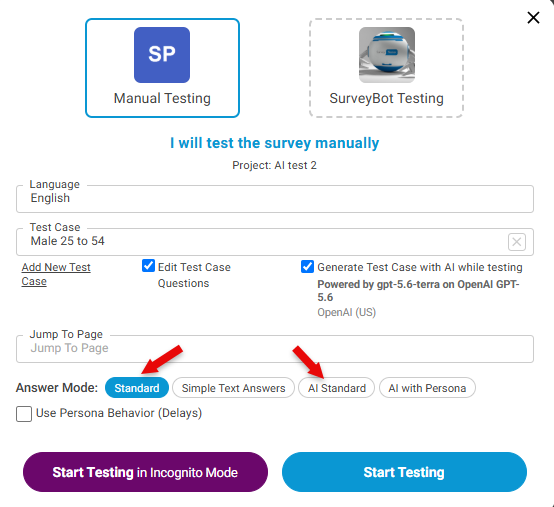
Result: SurveyTester creates responses using simple text values from the selected dictionary.
Example Use Case
A survey designer needs to test a customer satisfaction survey across different audience groups.
Using the SurveyTester AI Engine, the designer:
- Generates several test cases based on the survey objectives.
- Creates responses for a persona representing a frequent customer.
- Creates additional responses using simple text generation.
- AI Memory compares the results to validate survey logic, branching, and question behavior.
This process significantly reduces preparation time while providing comprehensive testing coverage.
Key Takeaway
SurveyTester AI capabilities now support both test case creation and response generation. Whether generating complete test scenarios, simulating realistic personas, or creating simple text responses, the AI Engine helps users test surveys more efficiently, improve coverage, and reduce manual effort.